


EasyLock
EasyLock allows you to lock a selected amount of your available balance from digital transactions.
What should I expect?

You control how much is locked and can unlock it anytime, with funds available immediately.

Applies to online and digital transactions only — branch withdrawals and bank obligations still proceed.

For EastWest payments, funds may be automatically unlocked in full on the due date if needed.
For EastWest payments such as loans, EasyLock funds may be automatically unlocked in full on the due date if needed to complete your payment and help avoid penalties. You can re-activate EasyLock anytime after.
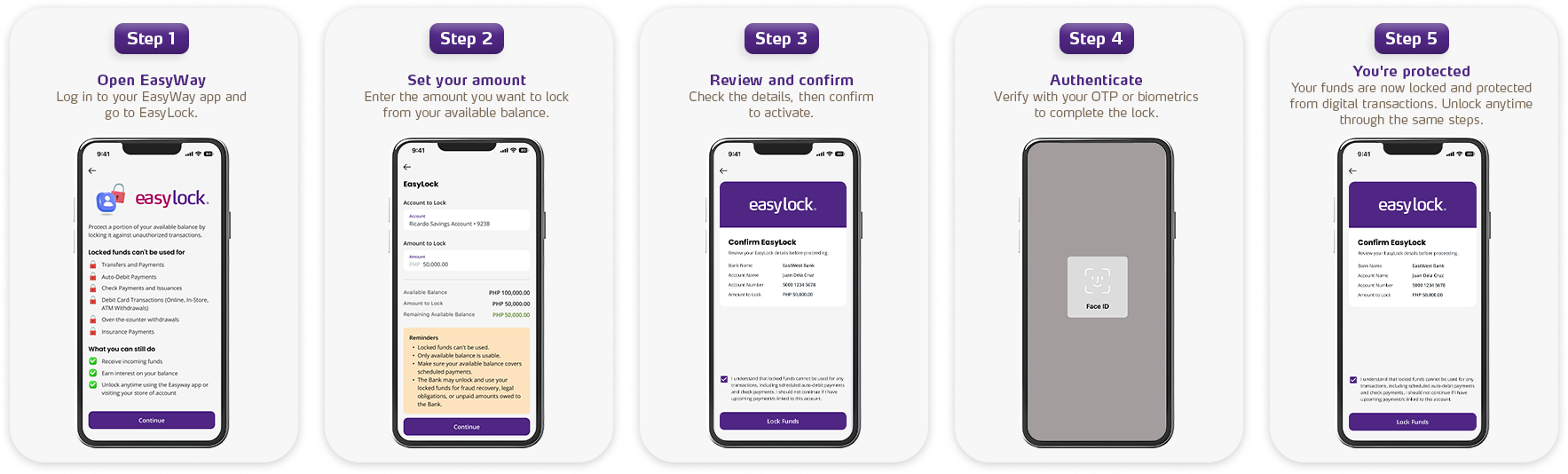
How to Activate EasyLock?
Lock part of your balance in just a few taps
Frequently Asked Questions
EasyLock is a feature that lets you lock a selected amount of your available balance so it cannot be used for online or digital transactions. It’s designed for customers who want extra peace of mind, especially if they keep larger balances in their accounts.
Yes. EasyLock is under your control. You can unlock or adjust the locked amount through the mobile or web banking app.
Once unlocked, the funds are available immediately.
EasyLock applies to online and digital transactions only. Certain bank obligations (such as loan auto‑debits or legal orders) may still proceed, as required by law.
By default, locked funds are not used. However, for EastWest payments (such as loans), the Bank may automatically unlock your EasyLock funds on the due date, if needed, to complete your payment and help you avoid penalties.
When you enable EasyLock, part of your balance is protected and cannot be used for digital transactions. However, scheduled payments are first attempted by using your available (unlocked) balance.
If your available balance is not enough, the outcome depends on the biller:
- For EastWest payments (e.g., loans), the Bank may unlock your EasyLock funds on the due date to complete payment, if available funds are insufficient.
- For non‑EastWest billers, only available funds are used. If insufficient, the payment will not go through.
Ensure you have enough available balance or unlock your funds before your due date for automated payments to avoid any disruption
If EastWest is your biller, you may receive a reminder before the due date to help you stay on track with your upcoming payment. This gives you time to review your balance or make any adjustments, such as unlocking EasyLock if needed.
If your biller is not EastWest, reminders will depend on their notification process.
If your available balance is less than the amount due…
For EastWest as biller (e.g., loans) –
- The Bank may unlock your EasyLock funds on the due date, if needed, to help complete the payment and help you avoid penalties.
- If your available funds + locked funds combined are still insufficient, standard collection processes apply.
For non-EastWest billers –
- The Bank will attempt the debit using your available balance.
- If insufficient, the payment will not go through and may be subject to the biller’s policies.
To avoid disruptions, ensure you have enough available balance or unlock your funds before your due date for automated payments to avoid any disruption.
If unlocking is required for an EastWest payment, the Bank will unlock your EasyLock balance fully to complete the payment. You can re‑activate EasyLock anytime after.
To avoid disruptions:
Always ensure your available (unlocked) balance covers scheduled payments
If unsure:
- Temporarily unlock funds before due date
- Or maintain a buffer in available balance
Failed payments will follow the standard collection procedures of the biller.
- If EastWest is the biller, you will receive subsequent collection notifications depending on your loan type informing you of what you must do
- For third-party billers, outcome will follow their respective processes